
You maintain a scoped, internal npm package on a private registry. You need to change its API. Which repos across the org depend on it, and at which version? The public npm ecosystem has tools for this question. The moment you put an @ in front of the name and point an .npmrc at your own registry, every one of them stops working.
Open the page for any popular public package on npmjs.com and click the Dependents tab. For lodash you get a number in the hundreds of thousands. The data is incomplete and the ranking is crude, but the question “who depends on this” has a first-class home in the public registry, and a small ecosystem around it: libraries.io, Google’s deps.dev, a dozen abandoned npm-dependents CLIs on the registry itself.
Now scope the package. Rename it from confit to @yourco/confit, set its access to restricted, and publish it to Verdaccio or the GitLab package registry instead of registry.npmjs.org. Everything you just relied on evaporates. There is no Dependents tab, because npmjs.com never sees the package. libraries.io and deps.dev crawl the public registry, so they are blind to it too. And there is no local fallback either: as the maintainer of one of those abandoned reverse-lookup tools put it, there is no npm command for retrieving a list or count of modules that depend on a given package, and the registry’s own dependents data only covers non-scoped public packages anyway.
So the reverse question is answered for the packages that can’t hurt you and unanswered for the ones that can. The package you scoped and locked down, the shared UI kit or the internal SDK that fifteen of your services import, the one whose breaking change is actually your problem, is precisely the one with no consumer view at all. This post is about getting that view back.
The scenario
Your platform or frontend-platform team publishes @yourco/ui. Maybe it’s a component library every web app imports. Maybe it’s @yourco/sdk, a generated client for your internal APIs. Maybe it’s @yourco/config, a thin package that standardises ESLint, tsconfig, and build settings across the org so nobody hand-rolls them.
It started as a way to stop copy-pasting. A few apps adopted it. Then more. Consumers declare it the ordinary way, in package.json:
{
  "name": "@yourco/checkout-web",
  "dependencies": {
    "@yourco/ui": "^4.2.0",
    "@yourco/sdk": "~2.1.0"
  }
}
Because it’s scoped and private, every consumer also carries an .npmrc that tells the package manager where @yourco resolves from:
@yourco:registry=https://gitlab.yourco.com/api/v4/packages/npm/
//gitlab.yourco.com/api/v4/packages/npm/:_authToken=${NPM_TOKEN}
Some consumers pin a caret range and float across minors. Some pin tighter. Some live in a monorepo and reference the package over the workspace: protocol instead of through the registry at all:
{
  "dependencies": {
    "@yourco/ui": "workspace:*"
  }
}
And the version each of them actually has installed lives somewhere else entirely, in a lockfile, which may say something quite different from the range in package.json. Twenty repos adopted the package. Then you stopped counting, because nothing in your toolchain counts for you. Now you need to change it. Drop a prop, restructure an export, bump a major. The question is the one that runs through every post in this series: which repos across the org depend on this package, at which version, and which of them break when I publish?
The change you ship without shipping it
Before the tooling, the part that makes this sharper than it first looks. A caret range is a standing instruction to adopt your next release automatically.
A consumer on "@yourco/ui": "^4.2.0" is not pinned to 4.2.0. They are subscribed to every 4.x you publish. The next time their CI runs a fresh install, or someone deletes a lockfile and reinstalls, they pull whatever the newest 4.x is and build against it. You did not roll it out. They did not opt in. If your “harmless” 4.3.0 minor carries a regression, you have just deployed it across every caret consumer on their schedule, not yours, and the first you hear of it is someone else’s red pipeline.
The mirror case is worth stating, because teams that have moved to exact versions usually assume it closes this. It does not. A consumer pinned to 4.2.0 is safe from your next publish and exactly as invisible to you as the caret one, and the better the discipline, the more 4.x versions are live at the same time. That is why finding consumers still matters when everything is pinned.
The reverse case is just as bad in the other direction. When you do the honest thing and ship a genuine breaking change as a major, 4.x to 5.0.0, caret ranges correctly refuse to follow. Which means every consumer stays on 4.x until a human edits their package.json and migrates. That is the right behaviour, but it leaves you with a long tail of repos stranded on the old major, indefinitely, and no list of who they are. You cannot deprecate 4.x because you cannot see who is still on it.
Either way, the version range is the mechanism, and the version range is exactly what a quick search across your repos cannot evaluate. You need to know who consumes the package and how their range relates to what you are about to publish. Both halves of that live in files most audits never open.
What existing tools give you (and where they stop)
I want to be fair to the options, because several are genuinely useful for the slice they cover.
npmjs.com Dependents, deps.dev, libraries.io
For public packages these are the right tools, and I’d point you straight at them. The structural problem is not that they’re bad. It’s that they are properties of the public registry. A private scoped package is access-controlled by design, served from your own registry behind a token, and never indexed by anything that crawls registry.npmjs.org. The same access control that keeps your code off the public internet keeps it off every public consumer graph. There is nothing to fix here. The data simply isn’t reachable, on purpose.
npm ls, npm explain, npm why
These do answer a reverse question, and people reach for them first. npm explain <pkg> (and yarn why or pnpm why in the other managers) tells you why a package is present in the current install: which dependency path pulled it in. It’s the right tool for “why is this transitive thing in my tree.”
But it operates on one installed project at a time, outward from that project’s own node_modules. It cannot tell you which other repos in the org depend on your package. To build the org-wide view you would run it in every repo, after a clean install in each, and aggregate the output yourself. By the time you finished, the lockfiles you installed from would have moved.
The private registry itself
This is the one people assume covers them, because the registry is the thing all the packages flow through. Verdaccio describes itself as a lightweight private proxy registry: host your private packages, cache the public ones, serve both from one endpoint. The GitLab package registry, Artifactory, Nexus, and GitHub Packages all do the same job.
They are very good at it. What none of them model is consumption at the source level. The registry records that some authenticated client downloaded @yourco/ui@4.2.0. It does not record which repo’s package.json declared the dependency, which team’s CI pipeline the install ran in, or whether the thing that pulled it was a service you care about or a throwaway branch. It’s a distribution and caching layer, not a consumption graph. This is the same gap I described for internal Go module proxies in the Go edition of this series: a proxy logs fetches, not the go.mod that triggered them. The npm version is identical. The download event is not the dependency edge.
(GitLab has at least started exposing what packages exist at the group level, after years of requests for a group-level packages API. That tells you what’s published across a group. It still doesn’t tell you who consumes it.)
Renovate and Dependabot
Both support npm as a first-class ecosystem, including private registries once you give them credentials. Because they’re configured per consumer, they implicitly know which repos depend on what, and they’ll open PRs to bump your package when you publish. As with Terraform modules and the rest of the series, the knowledge is in there.
But they’re updaters, not mappers. There is no org-level “show me every repo that depends on @yourco/ui, and what range each one declares” view to query. They react to new versions going out. The question you have before you publish a breaking one, who is currently consuming the old version and how, is not something either tool surfaces. And both only cover repos where they’ve been switched on for your registry. A team that never configured private-scope auth in their Renovate config is simply invisible.
Code search, and the script
You can search your GitHub org or GitLab group for the package name:
org:yourco "@yourco/ui"For a one-off audit, fine. It finds package.json files that mention the string and gives you a starting list of repos. Then the familiar problems land all at once. It returns the declared range, not the installed version. It doesn’t read the .npmrc to confirm the package even resolved from your registry. It won’t find a consumer that aliased the package under a different key, or one that references it over workspace:. And the index lags your most recent commits.
So someone writes the script. Enumerate every repo, fetch every package.json, parse the JSON, pull dependencies and the other three blocks, filter for your scope, then fetch the lockfiles to get real versions, handle three or four lockfile formats, run it on a schedule, store the results. People build exactly this. There’s a nice writeup of querying every package.json across Microsoft’s 4,000+ public repos with SQL to rank their most-declared dependencies, which is the same machinery pointed at the same data. The fact that this keeps getting independently rebuilt is the strongest evidence the question matters. It’s also a parser you now own, with every corner case below as your backlog.
Why this is harder than it looks
A naive search for the package name both overcounts and undercounts, because npm dependency consumption is not one fact in one place. It’s spread across several constructs that each behave differently.
The declared range and the installed version are different facts. package.json records a range, ^4.2.0. What that range actually resolved to, say 4.7.1, lives in a lockfile, and the lockfiles diverge by manager: npm writes package-lock.json, Yarn Classic and Yarn Berry write incompatible yarn.lock formats, pnpm writes pnpm-lock.yaml, and Bun shipped a binary bun.lockb you cannot grep at all before switching its default to a text bun.lock. For the question this post is about, who adopts your next release and who you’ll have to migrate, the declared range is the load-bearing fact, and it sits in package.json. The resolved version answers the adjacent question of what’s installed this minute, and it’s buried in whichever lockfile the repo happens to use.
The same name doesn’t always mean the same package. Scope-to-registry routing lives in each consumer’s .npmrc: @yourco:registry=.... A repo whose .npmrc is wrong, or missing, can pull a public package that happens to share your internal name, which looks identical in package.json and is not your code at all. So the name in the dependency block is a claim, not proof. Binding @yourco/ui to your repo safely means confirming the consumer really resolves your scope from your registry, not assuming every matching string is yours.
The value isn’t always a version range. A package.json entry’s value can carry the real target, and internal packages lean on this constantly. "x": "npm:@yourco/real@^1" is an alias: the key is x, the package is @yourco/real, and a search for the package name never matches. "@yourco/ui": "github:yourco/ui#v4", or git+https://gitlab.yourco.com/yourco/ui.git, is a git dependency that resolves straight from a repo and never touches a registry. "shared": "file:../shared" is local and carries no cross-repo signal at all. A scanner that reads only the key, or treats every value as semver, misses the aliased consumers and the git-sourced ones entirely. For an internal package, git references are not an edge case. They’re how a lot of orgs consume their own code without standing up a registry at all.
Workspaces make internal consumers invisible to the registry. In a monorepo, packages reference each other over the workspace: protocol, and pnpm and Yarn refuse to resolve those to anything but the local copy. The dependency never touches the registry, never produces a download event, never appears in any registry-side view. A consumer living in the same monorepo as your package has very real blast radius and a registry footprint of exactly zero. npm, Yarn, pnpm, and Bun implement workspaces a little differently, but they share that property: the edge is a symlink on disk, not a registry transaction.
overrides and resolutions can reroute the version behind the manifest’s back. npm overrides, Yarn resolutions, and pnpm overrides let a repo force a dependency, including a deep transitive one, to a pinned version or a forked replacement. The dependency block says ^4.2.0, the override quietly swaps in 4.6.3 or a patched fork, and the version running is not the one declared. This is the npm analogue of a Go replace directive, with the same trap: the apparent consumer and the actual consumer are not the same thing.
There are four declaration blocks, and they mean four different things. A package can appear in dependencies, devDependencies, peerDependencies, or optionalDependencies. A peerDependency on your package means the consumer expects the host application to supply it, so a breaking change ripples differently than it would for a direct runtime dependency. A devDependency breaks builds and tooling, not production. Flattening all four into one undifferentiated “depends on” both overstates and understates the blast radius, depending on which way you’re wrong.
What the full answer requires
To reliably answer “who consumes this internal npm package,” you need a system that:
- Scans every repo in the org, parsing each
package.json, without requiring each team to opt in or register - Resolves each declared dependency to the repo that actually produces the package, by matching the package name, with a guard so a public package that shares your internal name doesn’t bind to the wrong repo
- Reads the dependency value, not just the name, so
npm:aliases andgithub:orgit+httpsgit references resolve to the right in-org repo instead of being missed - Keeps
workspace:andcatalog:monorepo references while skipping purely localfile:andlink:deps that carry no cross-repo signal - Distinguishes the four declaration blocks, so a
peerDependencyconsumer and adevDependencyconsumer aren’t flattened into one edge - Leaves test, example, and fixture trees out of the consumer count, so a repo that imports your package only in a test harness doesn’t read as a production consumer
- Stays current through rescans, rather than a one-time snapshot that’s stale the moment a manifest changes
This is one of the specific problems Riftmap is built to solve. It connects to your GitHub or GitLab organisation with one read-only token, scans every repo, and parses every package.json to extract npm dependency edges. It resolves each declared dependency to the repo that produces the package, and reads the value rather than just the name, so npm: aliases and github: or git+https git references resolve to the right in-org repo instead of being missed. It separates the four declaration blocks into runtime, dev, peer and optional, keeps workspace: and catalog: references while dropping purely local file: deps, and leaves test and example trees out of the consumer count. Each edge carries the constraint the consumer declares and the package.json line where it lives. Parsed from what each repo declares, not inferred from what the registry happened to serve.
Two honest limits, in the spirit of the rest of this series. Riftmap reads the declared dependency in package.json, not the resolved lockfile tree. So it shows the range each repo declares, which is the fact that governs who adopts your next release, rather than the exact version each one has installed this minute. And it recognises internal packages by their scope, so a shop that publishes unscoped packages to a private registry is the current blind spot.
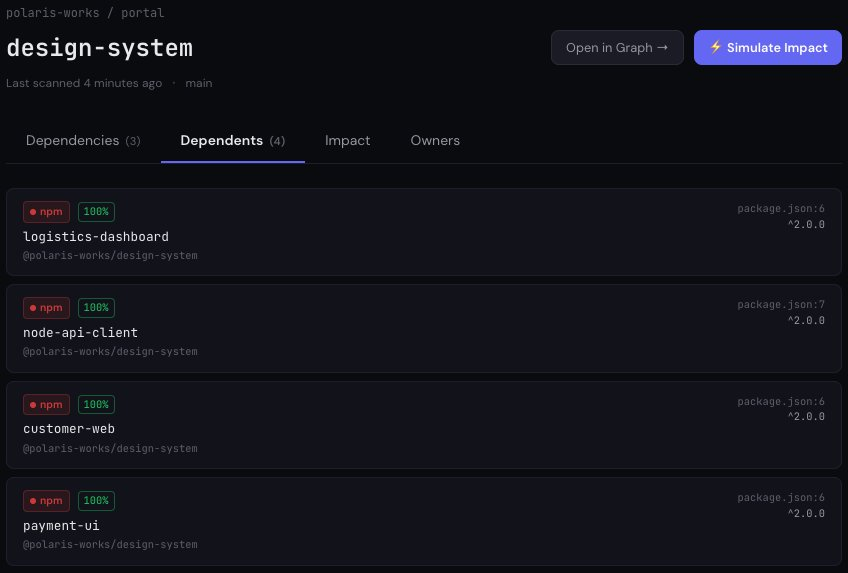
The result is the view the rest of this series describes. Before you drop that prop, restructure that export, or cut 5.0.0, you open the graph, click the package, and read the consumer list: every repo that depends on @yourco/ui, the constraint it declares, whether it’s a runtime, peer, or dev dependency, the package.json line where the dependency lives, and which team owns it. You know who breaks. You know who’s riding a caret range and will pull your next minor whether you meant them to or not. You know who’s stranded on the old major and needs a migration before you can deprecate it. No clean-installing thirty repos to run npm ls. No SQL over every package.json. No waiting to see whose build goes red.
A scope keeps the package private and the consumers invisible
Here’s the closing thought. A scoped, restricted package on a private registry is the right call. It keeps proprietary code off the public internet, and it gives you real control over who can pull it. That’s distribution, and the registry does distribution well.
But distribution and blast radius are different questions, and the registry only answers the first. It knows who is allowed to pull your package. It has nothing to say about who already did, what they declared, or what breaks when you change it. The public packages, the ones whose blast radius is somebody else’s problem, get a Dependents tab and a crawler ecosystem. Your internal package, the one whose breaking change lands on your own org, gets a download counter. The thing you did to protect the code is the same thing that hides who depends on it. That gap was never a property of npm. It was a property of where you chose to look.
This is the seventh post in the Find Every Consumer series. Previous posts cover Docker base images, Terraform modules, GitHub Actions workflows, Helm charts, Go modules and GitLab CI templates.
For the incident version of this question — when an advisory names a compromised package and you need to know which of your repos declare it, and at which constraint — see A CVE just hit your base image. Your scanner won’t tell you which repos to fix, which works through the May 2026 @antv/* compromise alongside the Docker case.
If this is a problem your platform team deals with, I’d be interested to hear how you’re solving it today. You can find more at riftmap.dev or reach me at hello@riftmap.dev.
About Riftmap
Riftmap maps cross-repo dependencies across your entire GitLab or GitHub organisation — Terraform, Docker, CI templates, Helm, npm, and more. One read-only token. No YAML to maintain.