
You maintain a shared GitLab CI template. You need to rename a job, change an input, or restructure the file. Which projects across your org include it? GitLab has been asked this question for nearly six years. Here’s the paper trail, and the actual answer.
In October 2020, a platform engineer posted a question on the GitLab forum: we generated a lot of internal templates which others can include in their CI/CD pipelines. Is there a way to see how often a template is included in other projects?
The answer they got was that no API contains this data, and that they could try grepping the nginx and Workhorse access logs on their self-managed instance and aggregating the raw fetch counts with jq. Web server logs. That was the canonical answer to “who consumes my CI template” in 2020.
Browse the sidebar of that thread and you find its siblings. “Reporting on Template Usage/Adoption.” “Tool to document CI Template includes.” “Find out how many times my gitlab-ci file has been used.” “Count the number of usages” predates the 2020 anchor thread by five months. Different years, same question, zero replies on every one of them. Nearly six years of template maintainers asking the reverse question into the void.
The forward question, how do I share CI config across projects, is one of the best-documented patterns in GitLab. The reverse question, who is consuming what I shared, has an answer so bad that grep-the-web-server-logs was a genuine improvement on the alternatives. This post is about the reverse question.
The scenario
Your platform team maintains a devops/ci-templates project. It started as one file. Now it’s a small library: build templates, deploy templates, a security scanning include, maybe some shared rules and defaults. Other projects consume it the standard way:
# In some-service/.gitlab-ci.yml
include:
  - project: 'devops/ci-templates'
    ref: v2.4.0
    file:
      - '/templates/build-go.yml'
      - '/templates/deploy-k8s.yml'
Twenty projects adopted it. Then fifty. Then you stopped counting, because there is nothing in the product that counts for you.
Now you need to change it. Rename a job that other pipelines extends from. Change a variable the deploy template expects. Split one file into three. The question is the same one that comes up for every shared infrastructure artifact: which projects across our org include this template, at which ref, and which of them break when I merge?
The part that makes GitLab worse than GitHub here
If you’ve read the GitHub Actions edition of this series, you know reusable workflows have the same visibility problem. GitLab’s version has a structural twist that makes it sharper.
In GitHub Actions, uses: requires a ref. Every caller pins to something, even if that something is @main. In GitLab CI, ref: on a project include is optional, and when it’s omitted, the include resolves to the HEAD of the template project’s default branch. Per the CI/CD YAML reference, that’s documented behaviour, not an accident.
In practice, most templates in most orgs are consumed without a ref. Which means a merge to main in devops/ci-templates is not a release. It is an instant, org-wide deployment of CI configuration to every consumer that didn’t pin. There is no rollout. There is no opt-in. The blast radius is the whole estate, and it detonates at merge time.
GitLab says this itself, in writing. The YAML reference now warns that including another project’s CI configuration is, from a security perspective, similar to pulling a third-party dependency, and that no pipelines or notifications trigger when the other project’s files change. Read that second clause again. The dependency is real, and it is silent. GitLab’s own template development guide makes the maintainer-side version of the same point: changes to templates consumed via include can break pipelines for every project using them, which is why GitLab treats its own template changes as breaking changes deferred to major releases.
And GitLab has lived this at platform scale. The master to main default-branch rename broke CI templates with hardcoded refs. In a more recent merge request touching the security scanning templates, a GitLab engineer noted that template changes can prevent whole customer pipelines from starting, described setting up dashboards to monitor for it, and acknowledged that customer feedback would probably surface a problem before their own metrics did. That is the maintainer of the world’s largest CI template library saying, candidly, that part of their blast-radius monitoring is waiting for users to complain. If GitLab’s own platform team operates partially blind here, your devops/ci-templates repo is not an outlier. It’s the norm.
Practitioners writing about this confirm the culture. A recent piece on versioning pipeline logic puts it plainly: an include pointing at main means every consumer inherits template changes immediately with no opt-in, manually pinning SHAs or tags across dozens of repos is labour nobody actually does, so teams ride main and hope. A dev.to author describes adopting git tags for their templates specifically so colleagues would stop fearing that a template change would break their release process. The fear is the default state. The unpinned include is the default configuration.
What existing tools give you (and where they stop)
I want to be fair to the options, because some of them are genuinely useful for parts of this.
GitLab code search
You can search for the template path across a group:
include "devops/ci-templates"Basic search will find string matches in blobs. Advanced search does it better and faster, but it’s a Premium/Ultimate feature, and on self-managed it requires you to stand up and operate the search infrastructure behind it, which a lot of instances simply haven’t done.
Even where it works well, code search gives you matches, not answers. It doesn’t extract the ref. It doesn’t distinguish include: project: from a comment that happens to mention the path. It doesn’t see the second hop: if your template is included by a wrapper template in another shared project, code search finds the wrapper, not the forty projects behind it. For a one-off audit it’s a reasonable start. It is not a system.
The CI lint API
GitLab can show you the fully merged configuration for a single project, includes resolved, via the CI lint endpoint. This is genuinely good for the forward direction: “what does this project’s pipeline actually consist of.” But it’s per-project, and it answers the wrong direction. To get the reverse view you’d have to call it for every project in the org and parse the results yourself, which brings us to the script people inevitably write.
The script
Enumerate every project via the API, fetch every .gitlab-ci.yml, parse the YAML, extract include: entries, filter for your template, extract refs, handle pagination and rate limits, run it on a schedule, store the results somewhere. Several teams have built exactly this. One platform engineer on r/devops described building an in-house mapper that treats shared CI includes as a first-class dependency edge alongside Terraform sources and Dockerfile FROM lines. The fact that this keeps getting independently built is the strongest evidence there is that the question matters. It is also a project you now own, with all the corner cases below as your backlog.
Renovate
Renovate’s GitLab CI include managers can detect project includes and open MRs to bump the ref. As with Terraform modules and GitHub Actions, Renovate implicitly knows who consumes what, because it’s configured per consumer. But it’s an updater, not a mapper. There’s no org-level “show me every project that includes this template” view, and it has nothing to say about the unpinned includes, which are the majority and the most dangerous.
CI/CD Catalog analytics
This one deserves real credit, because GitLab has started answering the question. With GitLab 19.0, the CI/CD Catalog gained a Components Analytics view: usage counts for your published components across all tiers, and on Ultimate, a drill-down showing exactly which projects included a component in a pipeline over the last 30 days and which version each one is on. GitLab’s own framing of the problem in the work item is almost word-for-word the premise of this series: component maintainers previously had no way to identify which projects used their component or which versions, making breaking changes and deprecations hard to coordinate.
So the gap is closing. But look at what the closure covers. It covers include:component, resources published to the CI/CD Catalog. It is usage-event-based, derived from pipelines that actually ran recently, rather than parsed from what repos declare. And the per-project answer is Ultimate-only, which is worth weighing against a parsed consumer map that costs nothing until you pass 250 repositories. The include:project template fleets, which is what nearly every self-managed enterprise estate actually runs on, including the devops/ci-templates repo in the scenario above, are not in scope. If you migrated your entire template library to Catalog components and bought Ultimate, GitLab now answers a 30-day usage version of the question. For everyone else, the 2020 forum thread is still the state of the art.
(GitLab also announced Orbit this week, a context graph across code, work items, pipelines and deployments for AI agents to query. It’s aimed at agent context rather than artifact consumers, and it’s early beta, so I gave it the proper look in a separate post.)
Why this is harder than it looks
A naive grep for the template path undercounts and overcounts at the same time, because include is not one mechanism. It’s five.
include:
  - local: '/ci/lint.yml'                       # same repo, not a cross-project edge
  - project: 'devops/ci-templates'              # the core case
    ref: v2.4.0
    file: '/templates/build-go.yml'
  - remote: 'https://gitlab.example.com/devops/ci-templates/-/raw/main/templates/scan.yml'
  - template: 'Jobs/SAST.gitlab-ci.yml'         # GitLab-shipped, not yours
  - component: $CI_SERVER_FQDN/devops/components/build-go@2.4.0
Each form has different semantics, and a consumer-tracking system has to treat them differently. local includes are same-repo plumbing, not a dependency on you. template includes point at GitLab’s shipped library, also not you. project includes are the core case. remote includes are sneaky: they can point at the exact same file in the exact same template repo, just over raw HTTP, and a search for include: project: misses them entirely. component includes wrap the project path in $CI_SERVER_FQDN variables and version suffixes that a literal string match won’t survive.
Nested includes are where the script dies. Template repos include other template repos. Your deploy-k8s.yml might itself include: project: a shared rules file from devops/ci-base. GitLab resolves these chains at pipeline time, up to 150 includes deep, with the added wrinkle that nested includes execute without context as a public user. If you change ci-base, the projects that break include projects that have never heard of ci-base. They included a template that included you. Finding the direct consumers is a string search. Finding the transitive ones requires a graph.
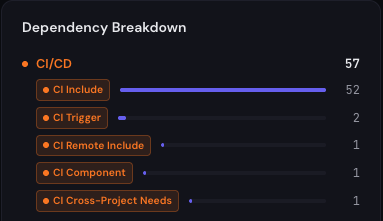
Includes are not the only cross-project CI edge. Multi-project pipelines via trigger: project: create a dependency on another project’s pipeline. Parent-child pipelines via trigger: include: can pull child pipeline definitions from other projects. Cross-project needs: [{project, job, ref}] creates a dependency on another project’s job artifacts. None of these are includes, all of them break when the upstream project changes, and a consumer map that only parses include: misses them.
The breaking surface is loosely typed. With spec:inputs, templates and components now have something like a declared interface, which is genuine progress. But the installed base of include:project templates communicates through variables, extends targets, and job names. Rename a job that downstream pipelines extends from and there is no compile-time error. There’s a pipeline that fails to start, in someone else’s project, at whatever time they next push.
What the full answer requires
To reliably answer “who consumes this CI template,” you need a system that:
- Scans every project in the group hierarchy, parsing
.gitlab-ci.ymlplus the template files that template repos themselves carry, intemplates/and.gitlab/ci/, because that’s where the nested chain starts - Extracts every cross-project edge type:
include:projectwith its ref and file list,include:remoteURLs resolved back to the repos they point at,include:componentreferences with the host variables and version suffixes stripped, plustrigger:and cross-projectneeds:edges - Knows which forms to ignore:
localincludes and GitLab-shippedtemplate:includes are noise in a consumer map, not signal - Reconstructs nested chains so a change to a base template surfaces the transitive consumers, not just the wrapper repo that includes it directly
- Records the ref each consumer declares, including its absence, so “who is riding an unpinned include” is a queryable fact rather than a suspicion
- Stays current through rescans of what the repos declare, not 30-day windows of what happened to run
- Makes the result one query: every consumer of
devops/ci-templates, with the file and line where the include lives
This is one of the specific problems Riftmap is built to solve. It scans a GitLab (or GitHub) org and parses every project’s CI configuration, emitting distinct edge types for project includes, remote includes, catalog components, multi-project triggers and cross-project needs, while deliberately skipping local and GitLab-shipped template includes. Template repos’ own templates/*.yml and .gitlab/ci/*.yml files are parsed too, so when a template includes another template, that edge is in the graph, and the transitive chain from a base template to its end consumers is reconstructed across the org. Each edge carries the declared ref as a version constraint, or its absence, plus file and line provenance. Parsed from what the repos declare, not inferred from what recently ran.
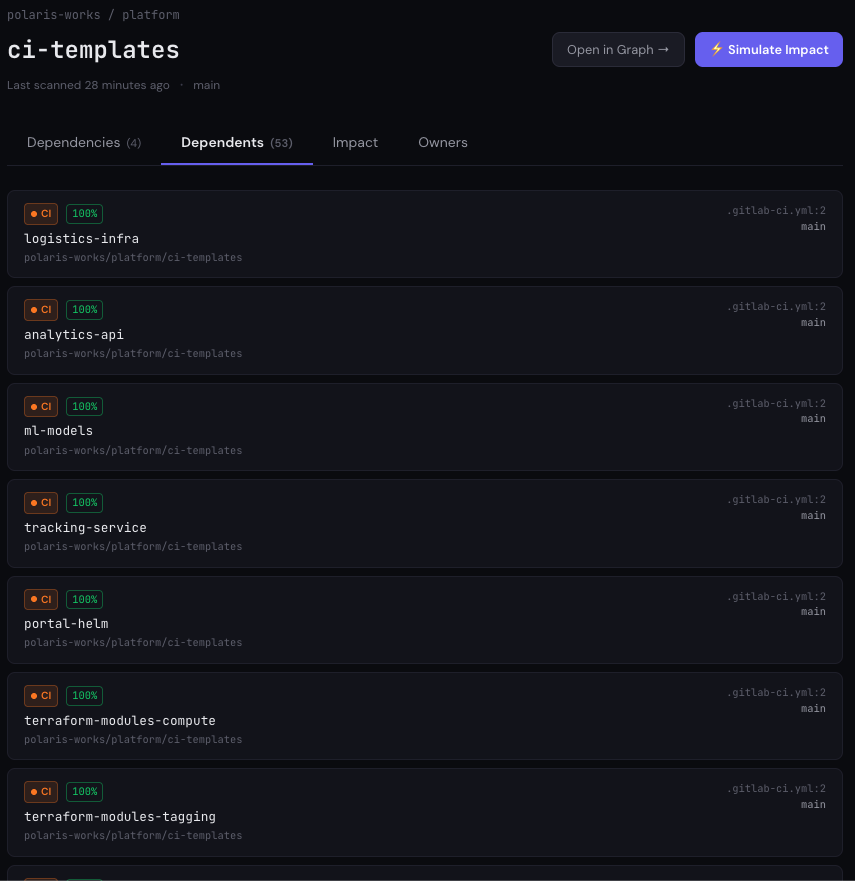
The result: before you merge that job rename into devops/ci-templates, you open the graph, click the template repo, and read the consumer list. You know who breaks. You know who’s pinned to a tag and has time, and who’s riding an unpinned include and gets your change at merge time. You know who to notify, instead of finding out who you should have notified.
Getting every project onto a pinned ref would be a real improvement, and it would not answer this question. A pin is each consumer’s veto over your change; it is not your list of who holds one, and nothing in the mechanism reports it back to the template repo. That is why finding consumers still matters when everything is pinned.
For the cross-platform treatment of that merge moment itself — why a shared CI change is really two deployments at once, instant to the unpinned consumers and silent to the pinned ones, and why CI has no deprecation signal to soften either — see You changed the shared CI template. Half the org got it instantly. The other half will never see it.
The dependency GitLab told you about
Here’s the closing thought. GitLab’s own documentation says that including another project’s CI configuration is like pulling a third-party dependency. Take that sentence seriously and follow it to its conclusion. We have norms for third-party dependencies. We pin them. We track who uses them. We check the blast radius before publishing a breaking change. Somewhere along the way, shared CI templates became the one class of dependency where the ecosystem’s answer to “who depends on this?” was grep your web server logs, and we collectively decided that was fine.
It was never fine. It was just invisible. The template that fifty projects include without a ref is the highest-leverage, least-observed dependency in your org. Treat it like one.
This is the sixth post in the Find Every Consumer series. Previous posts cover Docker base images, Terraform modules, GitHub Actions workflows, Helm charts and Go modules.
If this is a problem your platform team deals with, I’d be interested to hear how you’re solving it today. You can find more at riftmap.dev or reach me at hello@riftmap.dev.
About Riftmap
Riftmap maps cross-repo dependencies across your entire GitLab or GitHub organisation — Terraform, Docker, CI templates, Helm, and more. One read-only token. No YAML to maintain.